Login.jsp
|
1
2
3
4
5
6
7
8
9
10
11
12
13
14
15
16
17
18
19
20
|
<%@ page language="java" contentType="text/html; charset=UTF-8"
pageEncoding="UTF-8"%>
<!DOCTYPE html>
<html>
<head>
<meta charset="UTF-8">
<title>Insert title here</title>
</head>
<body>
<% session.invalidate(); %> <!-- 현재 세션을 종료. 첫 페이지로 오면 다 지움 -->
<center>
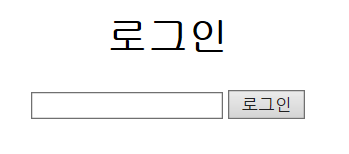
<h1>로그인</h1>
<form action=setProduct.jsp method=post>
<input type="text" name="name">
<input type=submit value=로그인>
</form>
</center>
</body>
</html>
|
cs |
setProduct.jsp
|
1
2
3
4
5
6
7
8
9
10
11
12
13
14
15
16
17
18
19
20
21
22
23
24
25
26
27
28
29
30
31
32
33
34
35
36
37
38
39
40
41
42
43
|
<%@ page language="java" contentType="text/html; charset=UTF-8"
pageEncoding="UTF-8"%>
<!DOCTYPE html>
<html>
<head>
<meta charset="UTF-8">
<title>Insert title here</title>
</head>
<body>
<%
request.setCharacterEncoding("UTF-8");
String name=request.getParameter("name"); //아이디 호출
session.setAttribute("login", name); //<세션> 아무것도 안 누르고 로그인 버튼 누르면 유효성 검사 하는 부분
// 로그인이라는 변수 안에
%>
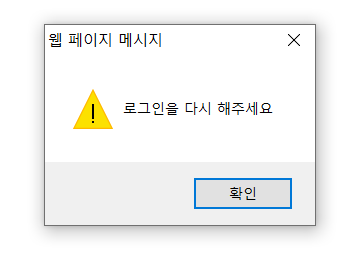
<% if (name == "" ) {
%><script>
alert("로그인을 다시 해주세요");
history.back();
</script>
<%
} else { %>
<center>
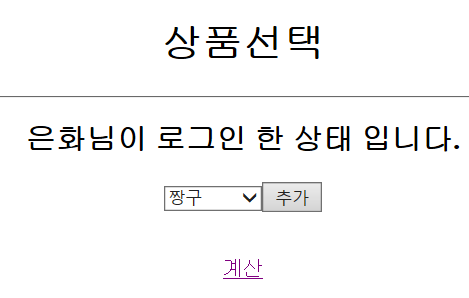
<h1>상품선택</h1>
<hr>
<h2><%=name %>님이 로그인 한 상태 입니다.</h2>
<form method=post action=add.jsp>
<select name="product">
<option value="짱구">짱구</option>
<option value="바나나킥">바나나킥</option>
<option value="홈런볼">홈런볼</option>
<option value="포카칩">포카칩</option>
</select><input value=추가 type=submit><br>
<br>
<br> <a href="checkOut.jsp" name=add>계산</a>
</form>
<br><br>
<% }
%>
</center>
</body>
</html>
|
cs |
add.jsp
|
1
2
3
4
5
6
7
8
9
10
11
12
13
14
15
16
17
18
19
20
21
22
23
24
25
26
27
28
29
30
31
32
|
<%@page import="java.util.ArrayList"%>
<%@ page language="java" contentType="text/html; charset=UTF-8"
pageEncoding="UTF-8"%>
<!DOCTYPE html>
<html>
<head>
<meta charset="UTF-8">
<title>Insert title here</title>
</head>
<body>
<%
request.setCharacterEncoding("UTF-8"); // 정보를 받을 때 한글이 깨질 경우 처리 가능
ArrayList<String> arr = (ArrayList<String>) (session.getAttribute("productList")); //<String>으로 형변환
// ArrayList는 값을 저장하는 배열
// int(숫자)는 없다는 값이 0 , 근데 객체는 없다는 값이 null(값 자체가 없다. 무의 존재)
/* arrayList 안에 아무것도 없으면 arrayList 생성 */
if (session.getAttribute("productList") == null) {
arr = new ArrayList<String>(); // 값을 저장하는 공간이라 상품을 하나라도 추가하게 되면 배열이 필요하므로 배열 생성. -> checkOut에서 출력하기 위해.
}
String productName = request.getParameter("product"); // request로 produce값을 받는다.
arr.add(productName);
session.setAttribute("productList", arr);
%>
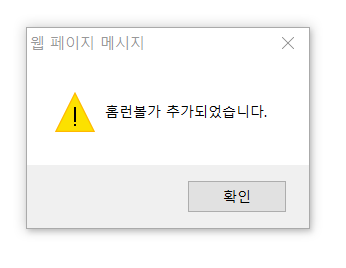
<script>alert("<%=productName%>가 추가되었습니다.");history.back();</script>
</body>
</html>
|
cs |
checkOut.jsp
|
1
2
3
4
5
6
7
8
9
10
11
12
13
14
15
16
17
18
19
20
21
22
23
24
25
26
27
28
29
30
31
32
33
34
35
36
37
38
39
40
|
<%@page import="java.util.ArrayList"%>
<%@ page language="java" contentType="text/html; charset=UTF-8"
pageEncoding="UTF-8"%>
<!DOCTYPE html>
<html>
<head>
<meta charset="UTF-8">
<title>Insert title here</title>
</head>
<body>
<% request.setCharacterEncoding("UTF-8");%>
<% ArrayList<String> arr = (ArrayList<String>)(session.getAttribute("productList")); %>
<!-- 배열이 선언이 되어있는데 받는 값이 없는 상태로 진행했을때 오류가 뜸 -->
<center>
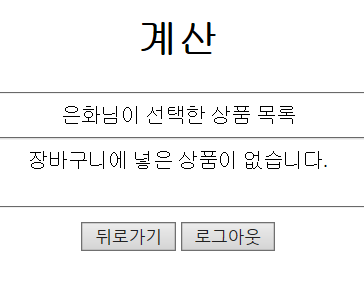
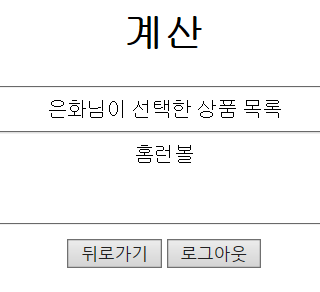
<h1>계산</h1>
<hr>
<%=session.getAttribute("login") %>님이 선택한 상품 목록
<hr>
<% if (arr == null) { %> <!-- 딱 한 번 때문에 필요한 것 / 없을 때를 가정해서 제어를 딱 한 번만 걸어준 것 ! 그 이후에는 뭔가 값이 있을 거기 때문에-->
장바구니에 넣은 상품이 없습니다.
<% } else {
for (String i : arr) { // 저장된 값만 가져옴
out.println(i); %><br> <!-- 출력 -->
<% }
} %>
<br><br><hr>
<table>
<tr>
<td><input type=button onClick="history.back()" value="뒤로가기"></td>
<td>
<form action=Login.jsp method=post>
<input value=로그아웃 type=submit></td>
</form>
</tr>
</table>
</center>
</body>
</html>
|
cs |
실행화면



'빅데이터 교육과정 (2021-01-25 ~ 2021-06-24) > WEB (02-22 ~)' 카테고리의 다른 글
| JDBC 이벤트처리 (0) | 2021.03.16 |
|---|---|
| 스키마란? (개념스키마, 내부스키마, 외부스키마) (0) | 2021.03.14 |
| JSP servlet API 종류 (0) | 2021.03.08 |
| JSP 에러 코드별 에러페이지 처리 (Servlet Exception Handling) (0) | 2021.03.08 |
| JSP 자바빈즈 (0) | 2021.03.08 |


